Last Updated:
.png)
Edits launched less than a year ago, and it’s already become one of the most powerful tools in a creator’s kit. When it originally launched, however, the reactions were quite mixed. There it was, another app from Meta, and another attempt to clone CapCut. But something interesting has been happening lately: Instagram has been updating Edits relentlessly, and the newest feature is turning heads.
You can now embed a link to another Reel or Instagram profile directly inside a video you’re editing in Edits, and that link carries over when you publish on Instagram. It looks cool and sounds simple, but it’s actually a bigger deal than it seems.
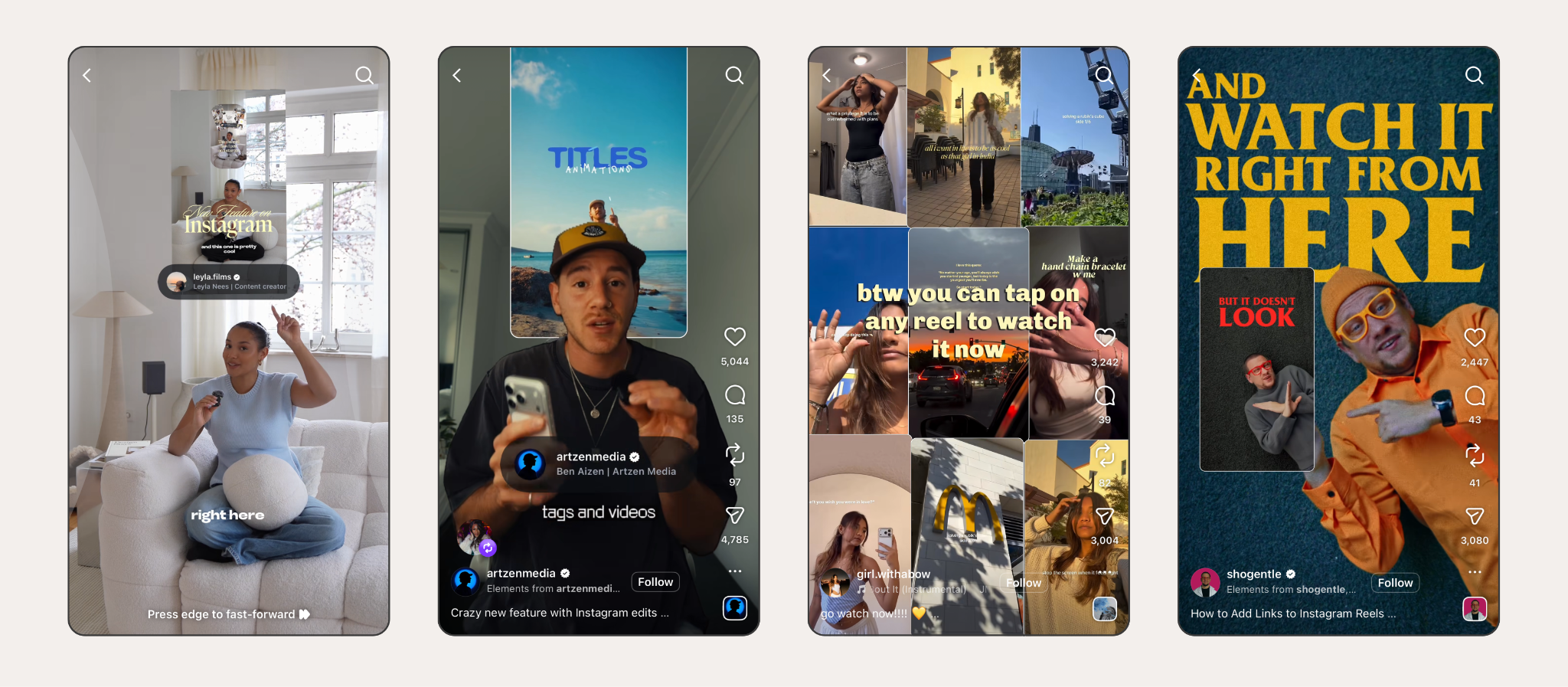
Here’s how it works: while you’re editing a clip inside Edits, you’ll see a new option to drop a link into your video. That link can point to another Reel or to an Instagram profile. When you export and post the video, the link shows up inside the published Reel for viewers to tap and interact with.
It’s important to note that you cannot link to an external website. This feature is limited to internal Instagram links only. It’s a closed loop, and a deliberate platform strategy to keep viewers inside the app.
Still, even with these constraints, there’s huge creative potential. Potential uses look like a fitness creator connecting a workout Reel back to a nutrition Reel. A brand and creator can cross-link each other’s takes on the same topic. Or a filmmaker releasing a multi-part content series can link episode two directly inside episode one to continue their story. It’s the strongest connective tissue that Reels have seen.
The linking feature is the newest to arrive in the slew of updates that Edits has launched since the start of the year. Since January, Edits has also received:
1. Weekly Ideas
The app now surfaces 10 personalized content ideas each week, generated based on the Reels you’ve shared within the app.
New effects include “bounce”, “fisheye”, “blackout”, and more.
3. Multiple Takes on Storyboard
You can now layer multiple audio and video takes onto your storyboard to compare and match segments before committing to a final edit.
4. IG & Reels Links in Videos
Before Edits rolled out linking Reels in Reels, they introduced linking clickable Instagram profiles in Reels.
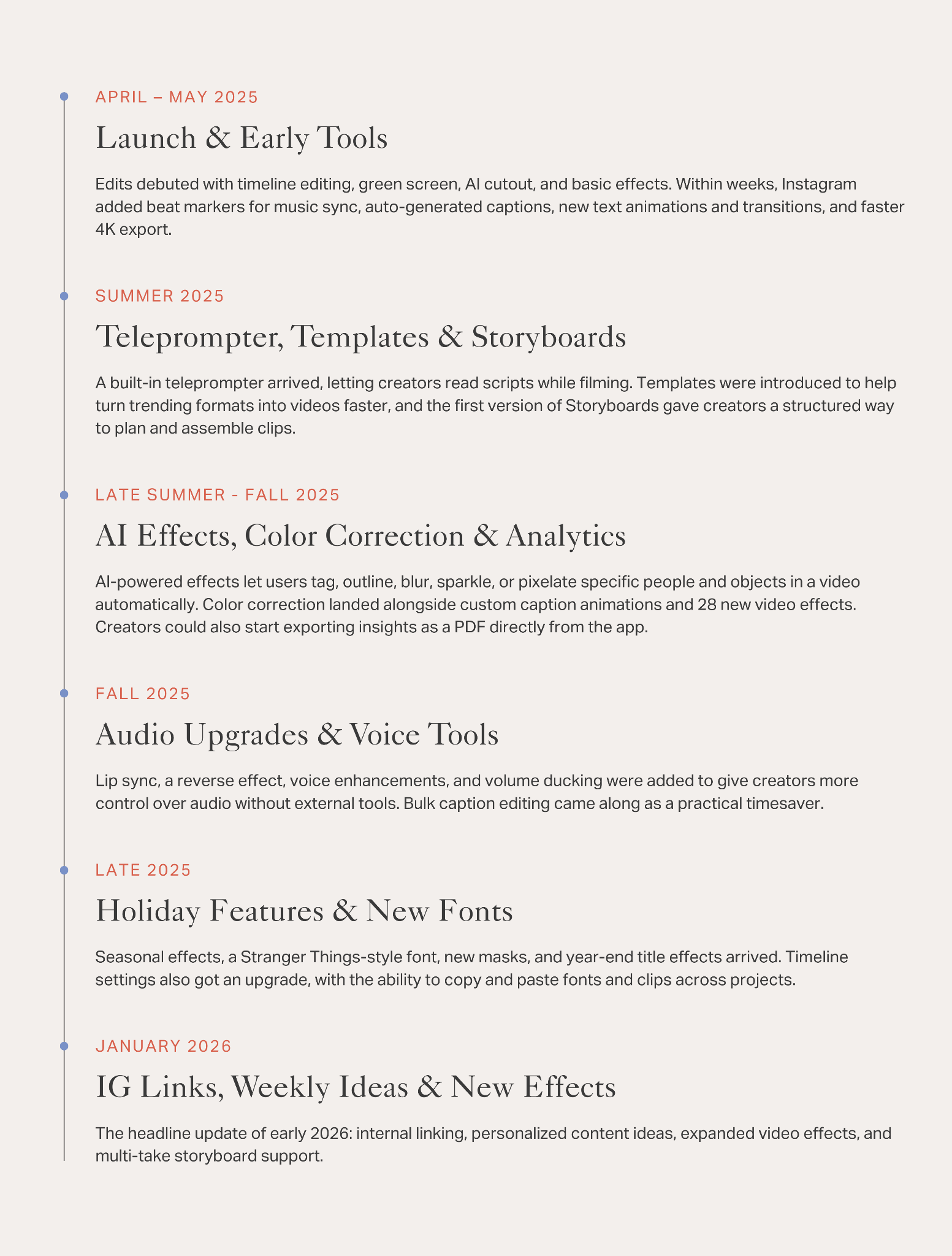
To understand why this newest update matters so much, it helps to zoom out and see how much ground Edits has covered since its launch. The app started as a standard, yet capable, mobile editor that has grown into a full-fledged production environment. Here’s a timeline of how the app has evolved up until now.
Behind all these updates is a very important driver; intent. Instagram is building Edits to be the default video editing app (good luck, CapCut). Every feature edition builds a stronger case for a user to reach for Edits over other popular editing apps like CapCut, Adobe Premiere, or DaVinci Resolve.
The linking feature specifically signals something more strategic. By letting creators connect Reels to other Reels and profiles, Instagram is nudging the platform toward a more intentional content architecture where creators build worlds with internal navigation, instead of isolated videos hoping to go viral. This new update is everything for anyone building a series, a brand, or targeting a niche audience.
The one legitimate concern for Edits, and Instagram in general, is clutter. The Edits app has a robust toolset, and it takes a bit of scrolling to navigate it correctly. At a certain point, feature density may become an issue if the app becomes too bloated. Instagram will need to stay very intentional about interface design as Edits continues to grow.
If you haven’t opened up Edits in a while, it’s worth another look. Odds are it’s a totally different environment than when you last visited. With this newest link update and Instagram’s latest push to move Reels to the forefront, it’s clear that video may soon become to the forefront of Instagram.