Last Updated:
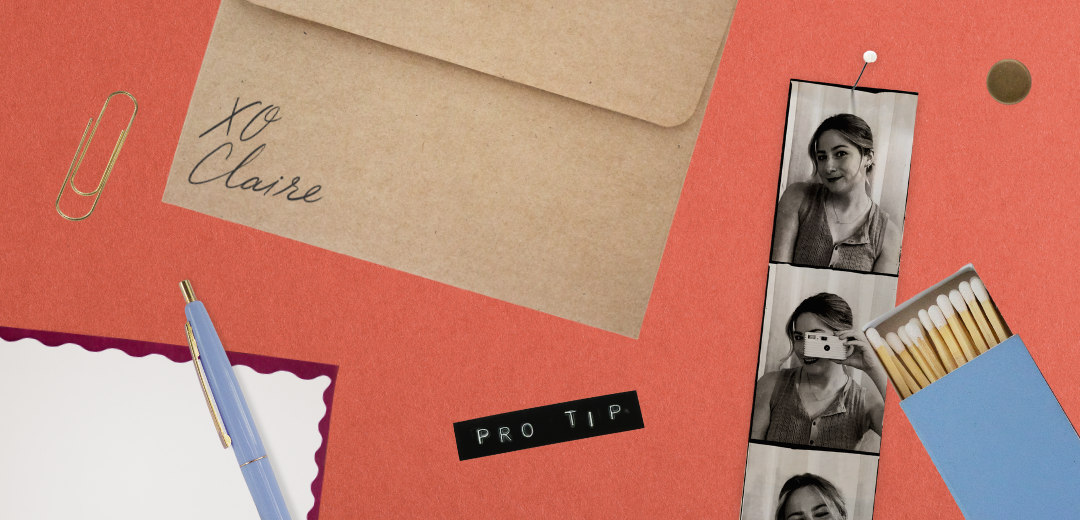
The most interesting designs on social right now don't look like they were made on a screen. Items like paper with torn edges, washi tape, handwritten phrases, and grainy textures have become increasingly popular ways to bring a human touch to digital assets. This ‘scrapbook’ aesthetic has grown in popularity over the past year — and for good reason. It’s warm, refreshing, and tactile in a way that flat digital graphics rarely are.
There are many ways to join this trend — including purchasing element packs online, or browsing the Canva Pro library — but here at Planoly, we like to use real-life objects, photographed and digitized. By sourcing the objects we want to use and digitizing them ourselves, we’re able to create assets that are perfectly on-brand and full of details and decisions that simply can’t be replicated any other way.
It’s easier than it seems, and the payoff is more than worth it. Here’s how it works and why it’s worth trying yourself.
The scrapbook trend in digital design isn’t just aesthetic nostalgia. It’s a response to how saturated digital content has become, and how easy it is to create. Audiences want to see proof that the content they’re consuming has been crafted with care. Seeing a creator’s real (imperfect) handwriting, or the wonky edge of a torn piece of tape, signals effort and intention — and allows a design to stand out in a sea of pixel-perfect graphics.
The problem is that most brands are sourcing the same “handmade” look from the same places. While the Canva Pro library has some great options (trust me, we’ve used them!), these same elements are being used on thousands of other graphics. And sites like Creative Market have many element packs for sale, but oftentimes they contain hundreds of elements you may not even use. Additionally, it’s become increasingly common to see AI-generated objects in these packs, which lack realism and fall flat in designs.
The alternative is to actually make the things you’re looking for. This gives you more control for only marginally more effort — and it’s honestly incredibly rewarding.
Much of the elements you see in Planoly’s social content — paper textures, tape, cards, torn edges — started as real physical objects that were photographed and digitized. Though this may sound complicated, the process is less about having a sophisticated setup and more about having a good eye and a little patience.
A good example: during a Black Friday campaign, we had a vision to feature one of those tear-off flyers — the kind stapled to telephone poles with pull tabs at the bottom. Rather than faking it in Photoshop, it was easier and more effective to just make one. The result had a level of detail and realism that no digital recreation would have matched.
The same holds true for the newspaper we made for our recent webinar series, Business School. We could have simply overlaid text on a stock photo, but designing and printing a real newspaper gave us something far more compelling. Plus, seeing it in person and shooting content with it brought a sense of energy and excitement to the team that wouldn’t have been possible with a purely digital approach.
A good rule of thumb: if you can make the real thing, just go for it.
The barrier to entry here is lower than it seems. You don’t need a professional photography setup. A phone camera near a window gets you surprisingly far, especially for flat objects like tape, paper, fabric swatches, pressed flowers, handwritten notes.
A few things to note before you start:
Lighting matters way more than equipment. Find a simple background, some natural light, and your camera. You can use a DSLR, a point & shoot, or even your phone camera –– shooting in bright, even lighting is what matters most here. Foam core works great as a clean background, and doubles as an effective reflector when covered in tin foil.
Imperfection is actually the point. Don’t over-style what you’re photographing. The slightly uneven edge, the natural warp in the paper — that’s what makes it look real. Fight the instinct to make it too clean.
Editing is easier than it seems. Automatic background removal tools in Photoshop and Canva can handle most simple objects well with minimal cleanup. Additionally, the color editing tools in Canva and Photoshop can easily adjust the colors of your subject to perfectly match your brand!
Start with what you already have. You don’t need to go hunting before you try this. A piece of washi tape, a torn magazine page, an envelope with an interesting texture — anything flat and photogenic is fair game.
The benefit of this process is simple: it gives your brand something that can’t be downloaded. When you build a library of digitized physical elements, you’re building a visual identity tied to objects that no one else has access to. That accumulates into something immediately recognizable over time.
It’s also often faster than the alternative. An hour of wrestling with an AI image tool to get it to produce exactly what you’re picturing is sometimes just longer than making the thing yourself and taking a photo. The physical version exists in ten minutes — and the AI version might not ever actually exist the way you imagined it.
Above all, the process of moving from physical objects to digital assets is fun and rewarding. It requires actually going out into the world, paying attention, and making things with your hands. And the feeling when you place your creations into a design and they look exactly as you hoped can’t be matched by any downloaded element pack.
Next time you’re looking to design some social content, give analog creation a try. It’s a great way to stretch yourself creatively, think about your content differently, and build a visual identity that’s unmistakably yours.
.png)